Setting MPE as the default message app

For user who dont speak german please use this part of my forum
pzh9l
Beiträge: 34
Registriert: So 22. Jul 2018, 21:11

Setting MPE as the default message app

Beitrag von pzh9l »

Hi,

just got myself a Honor Lite 9 smartphone (Huawei), great phone for the price if you ask me.

I'm being bothered with an irritating problem : I have changed the default messaging application to be MPE of course (instead of the stock Android message app), it all seems to work fine, BUT :

the phone keeps trying to have me revert to the default SMS application, and does so in two ways :

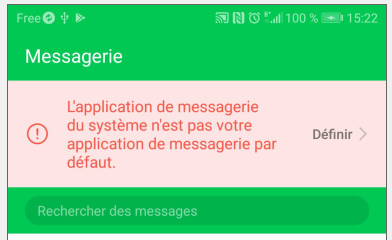
- first, by displaying a large text area with a pink background at the top of the main SMS page (the one listing all the sms sent/received), with a warning message inside saying "beware ! you are not using the default messaging application !" (or s'thing similar) - duh !? I know that, thank you.

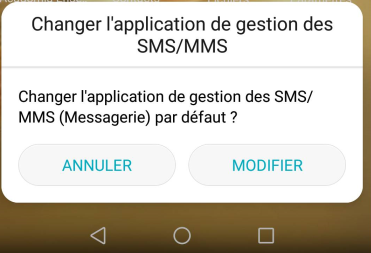
- second, by regularly prompting me to revert back to the default app, and this means an annoying situation where I *must* each time click on Cancel on the phone touchscreen if I want to continue with sms send/receive via MPE. :?

Not a complete showstopper, I can continue to happily use MPE (what a GREAT app, really !!), but I'd rather get rid of this silly bug.

I suspect this has more to do with EMUI 8 (the additional OS layer Huawei imposes on their smartphones), than with MPE or even Android 8.0 - but I'm not really sure, anyway would be glad to know if anyone here is experiencing the same issue and/or has a solution for it.

Thanks ! :)

EDIT : forgot to mention, until recently I used to have a Wiko smartphone under Android 4, and never had this problem with it.
Zuletzt geändert von pzh9l am So 16. Sep 2018, 12:26, insgesamt 2-mal geändert.
pzh9l
Beiträge: 34
Registriert: So 22. Jul 2018, 21:11

Beitrag von pzh9l »

Forum pretty dead these days, must be the vacations period...

Anyway I just found this other, very similar topic : https://www.fjsoft.at/forum/viewtopic.php?t=24699
which reminds me that in addition I also must manually sync MPE in order to have the received sms copied over to the PC, again because of this stupid prompt on the phone asking if I want to change from the default sms app. :evil:

Anyway, looks like phones under EMUI layer from Huawei do exhibit this irritating, time consuming issue.

Though, considering the lack of responsiveness on this forum, it may be that many others here experience the same problem but don't bother posting, so maybe it's an all round *Android* issue (v7 and 8 ?), not just an EMUI one.

Would at least ONE Android7 or 8 user post here to tell us if they have - or don't have - the same issue ? Please ??

Btw Koelner's answer (in the topic posted above, for those willing to make the effort to go read it) saying that "it's the best it can do" is not accurate, since I never had this problem before with my older Android 4 based smartphone.
pzh9l
Beiträge: 34
Registriert: So 22. Jul 2018, 21:11

Beitrag von pzh9l »

Looks like I'll be the only one posting and "helping" here... :lol:

I've found a way in the smartphone parameters to refuse access to the sms to the base sms appli (lol), such that now only MPE is allowed to access them.

And guess what ? I could write and send an sms from my pc via MPE without a glitch ! No more prompt on the phone, it went out directly (and the answer came back the same, no more prompt asking me for the 589th time if I want to use the base sms app or the one I've defined as the new default app).

Ok... so this proves that when not bothered by a stupid Huawei software layer on top of Android 8.0, MPE works perfectly fine !

Now, it doesn't resolve much of anything yet however : because this would mean having to re-allow access each time I work on the phone, and again disallow access whenever I work from my pc.

There is NO WAY on Earth I can accept such a hassle.

So the grand search for a solution continues, I have now contacted the support people at Honor (one would say, I should have started with that step first ^^), let's see how they respond... (a little more responsive than this forum, hopefully :mrgreen:)
Koelner
Beiträge: 1691
Registriert: Do 11. Okt 2012, 21:12
Wohnort: Deutschland

Beitrag von Koelner »

pzh9l hat geschrieben:There is NO WAY on Earth I can accept such a hassle.

So the grand search for a solution continues, I have now contacted the support people at Honor (one would say, I should have started with that step first ^^), let's see how they respond... (a little more responsive than this forum, hopefully :mrgreen:)
You do know, that this behavior comes with changes in the Android System since Android 5?
Nur Geduld! Mit der Zeit wird aus Gras Milch.
pzh9l
Beiträge: 34
Registriert: So 22. Jul 2018, 21:11

Beitrag von pzh9l »

Wot ? :shock: No, I didn't know about changes in Android 5 that would affect that specific behaviour, I'm merely a smartphone user (and simple web apps non-pro programmer), not been following Android developments.
So first off, thank you for answering my request ! I've actually posted it in various places/forums over the last few days, and yours is the 1st answer I finally get.

So it appears my request has very little chance to go anywhere, and this is *very* bad news for me. Also, I'm surprised not having found on the net many requests or complaints about this, this MUST bother lots of Andoid phone users, it's really frustrating and time wasting for anyone using their phone in more than just a basic "consumer" way.

Since your post I've had a look around to find out about this behaviour change in Android 5, not found any mention of it yet, e.g. here : https://developer.android.com/about/ver ... .0-changes
but maybe I'm misreading it, probably mentioned somewhere in that page.

I'm going to start looking into Android developers areas, there probably is a way to workaround this limitation (I mean the prompting, it should just go ahead and switch app w/o asking) programmatically... well, maybe.
pzh9l
Beiträge: 34
Registriert: So 22. Jul 2018, 21:11

Beitrag von pzh9l »

Ok so I've got (bad ?) news.

I've installed Chomp SMS on my phone, then set it as the default SMS app, and used it to send and receive a couple of sms, and...

no more pink area warning crap, and no more annoying prompt, it all works fine as expected : Chomp is used as the default sms app and the phone makes no fuss about it. :idea:

So why does it work fine with Chomp, and not with MPE. Is MPE the source of the problem then ?

Or maybe *any* app that allows to manage/control/sync the phone from a pc would exhibit the same problem ? Well, dunno of any other app of that type, but I'll do a search and see what I can find.

My complete setup btw :

- PC: laptop running Windows10 Pro x64 (build 17134)
- MPE rel. 1.8.9 on pc, and 1.0.47 on phone
- Phone: Honor 9 Lite under Android 8.0 (Oreo) and EMUI 8.0


P.S. if by any chance the MPE developer(s) read all this, their input would be much appreciated.
Koelner
Beiträge: 1691
Registriert: Do 11. Okt 2012, 21:12
Wohnort: Deutschland

Beitrag von Koelner »

No, the problem is, that any phone with Android 5 or higher does only support one SMS App at the time.
Before that you could have several at the same time. That´s what made the change in the MPE necessary. And because many people complained about the rather complicated way to change the default SMS app via phone settings, the MPE got this pop-up to help them.

BTW: If that pop-up is not white with black writing, there´s something wrong with your phone.
Nur Geduld! Mit der Zeit wird aus Gras Milch.
pzh9l
Beiträge: 34
Registriert: So 22. Jul 2018, 21:11

Beitrag von pzh9l »

Ah, that's very interesting, I wish I knew this from the start... (would have spared me lots of time researching and posting on other forums)

So it is indeed MPE that generates the prompt asking the user if he/she wants to switch app ! (upon requests from users, which means that MPE developers do listen to customers/users, this is great, many thanks to the dev team !).

Which explains why other sms apps do not generate similar prompts. Ok, now this is clear. I'll post a screenshot of the prompt below, so that you can check that they're initiated by MPE, i.e. not a problem with my phone.

I'll also post a screenshot of the warning message in the sms page (text area with a pink bgrnd color) - I suppose then that this warning message is also generated by MPE ? (since it also offers to switch app directly)


Now the question remains : why, oh why ? does MPE constantly generate prompts (and the warning message) even AFTER I have definitely decided to use the MPE client as the Default SMS app ?? Makes no sense.

Once the user has confirmed that he/she wants to use the MPE client as the default app, shouldn't MPE stop asking and warning ? (which other sms apps like Chomp do btw, I've tried it and NO prompt or warning message at all, Chomp is set as the default sms app and it works just fine !)
Zuletzt geändert von pzh9l am Do 26. Jul 2018, 16:18, insgesamt 1-mal geändert.
pzh9l
Beiträge: 34
Registriert: So 22. Jul 2018, 21:11

Beitrag von pzh9l »

Here's the image showing the prompt : (which btw appeared for no reason, just by pushing the "on" button on the phone to get started)

Bild


And the warning message at the top of the SMS page :

Bild

(as you can see the "Définir >" thing on the right ("Define") allows the user to switch default app, just like the prompts.)
Koelner
Beiträge: 1691
Registriert: Do 11. Okt 2012, 21:12
Wohnort: Deutschland

Beitrag von Koelner »

Either you set the MPE as the default app or an other but if you set the MPE you have to keep your fingers of any other SMS app.
The moment you tap any other SMS app, you start that whole process again.

That green/pink message is NOT done by the MPE.
Nur Geduld! Mit der Zeit wird aus Gras Milch.
pzh9l
Beiträge: 34
Registriert: So 22. Jul 2018, 21:11

Beitrag von pzh9l »

Koelner, I understand what you're saying and this is normal behaviour - however let me say that again : once I have selected MPE to be my default sms app on the phone, I NEVER try to revert to the base app or any other app (I only have those two installed anyway). So why this prompting bizness over and over and...?

Looking around the phone's Parameters section, I've just found another intriguing parameter : it's possible to disable any phone app from accessing and modifying system parameters. Hmm... so what I've just done is indeed disable the base SMS app from accessing system parameters. We'll see if it improves the situation or not.

As for the warning message, it's only the pink area, the green part is the overall color I get on the sms page and inside an sms, this is the default color on this phone I haven't tried to change it - yet.

But I take note that it's NOT created by MPE (are you absolutely sure btw ?), and will therefore investigate further (with Android and/or Huawei people), don't like at all that pink thingy, it stands out way too much plus takes real estate on the screen...


Btw there's also another issue, but with the "Control Phone" thing (not related to the above issue) : when I click on an sms in the MPE phone window on my laptop, instead of opening the sms MPE *selects* it (checkbox checked), it acts as if I was doing a long tap on the phone. Heard about that "bug" ?
pzh9l
Beiträge: 34
Registriert: So 22. Jul 2018, 21:11

Beitrag von pzh9l »

NEWS !! I might have FINALLY got around the prompt issue :!:

As I mentioned above, I have denied the base SMS app the right to modify system parameters, then tried full circle sending and receiving, from the phone and from the MPE app on the laptop, and... SUCCESS !!

It all went perfectly well, no more prompting, no more delay, the sms got sent and then received, notifications on the phone and on the laptop plus automatic sync with MPE on the laptop did occur as expected. Maybe this is it then ! :D

Now if I could get rid of that pink thing... which btw ONLY appears with the MPE client, I never had it appear with Chomp SMS... are you really, REALLY sure it's not due to MPE ?? (just to avoid spending hours on other forums and with Honor support people while it's strictly an MPE issue)
pzh9l
Beiträge: 34
Registriert: So 22. Jul 2018, 21:11

Beitrag von pzh9l »

I was right to say "maybe" yesterday : though overall it's acting normally, I'm still getting the pesky prompt every now and then, with no reason, even when I don't interact at all with the phone... :?

But at least (and at last !) I've got the sync fully operational in both directions, the prompt doesn't interrupt sms sending/receiving/sync'ing anymore, I get all notifications on the phone and on the pc as expected - and whenever it does show up I just have to tap anywhere on the screen (except in the prompt area of course ^^) to get rid of it, then things continue normally.

So I'd say it's not too bad, though still a tad annoying.
pzh9l
Beiträge: 34
Registriert: So 22. Jul 2018, 21:11

Beitrag von pzh9l »

Ok... I should have read other's posts more carefully, it would have prevented me from posting unnecessary rantings. :oops: in particular, the fact that an sms app MUST be the default app for the time it tries to send an sms.

OTOH, I have now tried various sms apps and various configurations (default app vs app used to (try to) send an sms), and not all sms apps behave the same, which added to my confusion...

The stock app allows you to send an sms without prompting you to change the default app, even if the stock app is not the default. Or maybe it does so silently (set itself as the default app temporarily, send the sms, then revert the default app to what it was initially, eg Chomp SMS).
The only thing that tells you it's not currently the default app is the warning message (pink text area).

For the 2 other apps I've tried (Chomp SMS and Pulse SMS), it's different : if you try to send an sms from one of these apps while the app is not the default, then it first prompts you to modify the default app, and if you don't, it simply does not send the sms.
Also, the warning texts differ : Chomp SMS displays a "UTILISER PAR DEFAUT (set to default) in large uppercase letters but in the same green background as the app (no pink area) so you don't necessarily notice (again potentially confusing for me), while Pulse SMS does exhibit the (in)famous pink area warning.

So... given all that, the decision is now clear : I will set MPE as the default sms app, and since it doesn't harass you with a prompt I will use the stock app when typing on the phone. And that'll do, over time I'll probably stop paying attention to the warning, and the inexplicable prompts I get every now and then (I'll try to get rid of these too, we shall see).

I'll change the topic title to indicate I'm done with this.

Maybe this will help other people understand this sms handling and "default app" thing, maybe not - but it's there anyway.
pzh9l
Beiträge: 34
Registriert: So 22. Jul 2018, 21:11

Beitrag von pzh9l »

Not that I expect much response here, but I'll post anyway :

1- I can't receive MMS images/photos when MPE is the default sms/mms app. And by that I mean I receive nothing, no notification or sms/mms on the phone, nothing in MPE on the pc either, it's like nothing was sent (I do receive mms when switching back to the default Android app). Anyone here with the same issue ?

2- when MPE is the default sms/mms app, sometimes I do receive sms messages both on the phone AND on the PC almost simultaneously (the expected behavior), but most of the times the received sms (on the phone) does not get transferred and not even notified within MPE on the PC.
Again here, anyone with the same issue ?

Other than that, I'm still to look for a viable solution to switch the default sms/mms app from stock Android to MPE, right now what I do is first wake up the phone, then send a dummy sms to myself to trigger the pop-up message prompting me to switch to MPE client - otherwise I tend to forget when I get back home after a long work day and write sms on my pc that are indeed sent, but "lost" by MPE (the prompt does not work or does not send an alarm while the phone's screen is off)
Koelner
Beiträge: 1691
Registriert: Do 11. Okt 2012, 21:12
Wohnort: Deutschland

Beitrag von Koelner »

pzh9l hat geschrieben:I can't receive MMS images/photos when MPE is the default sms/mms app.
That´s to be expected because the MPE can´t handle MMS. I´m sorry but there is no workaround for that.
pzh9l hat geschrieben:when MPE is the default sms/mms app, sometimes I do receive sms messages both on the phone AND on the PC almost simultaneously (the expected behavior), but most of the times the received sms (on the phone) does not get transferred and not even notified within MPE on the PC.
There is no watchdog in the MPE covering your phones activities all the time. Transfer from SMS to the PC happen only when there is a live connection between phone and PC.


I´m sorry to say that but in all those years the MPE now exists, your problems are kinda unique. FJ has build in many functons into the MPE that were requested or seemed logically. But there are limits when it comes to some particularities. Changes in the MPE can only be made if not the majority of users get problems with that change. And on the other hand each phone manufacturer builds it´s own system. So there are some phones that work better with the MPE than others.
My advise would be to find a way of handling the MPE in a way that it helps you and not expect the jack of all trades device.
Nur Geduld! Mit der Zeit wird aus Gras Milch.
pzh9l
Beiträge: 34
Registriert: So 22. Jul 2018, 21:11

Beitrag von pzh9l »

Koelner, while I understand what you're saying and in general would tend to actually agree - you also have to understand that all of this used to work fine under Android 4.1...

Seems to me that the connection doesn't stay "live" for very long even though of course the phone is connected to the pc (via usb) all the time while I'm at home working on the pc. I really don't understand why the connection, once established b/w the pc and the MPE client on the phone, doesn't stay ON until the phone is disconnected. Why oh why ??

So I now have to manually do a refresh on the MPE window each time I hear a sms notification/alarm on the phone, otherwise the sms doesn't get copied over to the pc so that I can read it there in MPE. But this was NOT the case before, I never had to do a refresh - so what happened since then with Android and/or MPE ? would be my question...

As for the MMS I know that MPE can't handle them and never complained about it, quite the contrary I'm very happy with MPE the way it is - or was. But at least with my previous phone/Android version I could receive MMS on the phone while connected with MPE, but now it doesn't work anymore, and worse yet I don't even get a notice on the phone that someone tried to send me an mms !
If it's not clear enough : I am NOT requesting that MPE should handle the MMS, just asking to let them get into the phone when someone sends me one.

But as I understand it, this is Android's fault, because of that "default application" sh*t it introduced a few years ago. F*ck Google for doing this (and more serious matters about privacy, but that's another subject) because all of a sudden MPE is way less easy to use and less powerful. :x
Koelner
Beiträge: 1691
Registriert: Do 11. Okt 2012, 21:12
Wohnort: Deutschland

Beitrag von Koelner »

You´re using a Huawei device, right?
Well, I hate to say it but that is a big part of the problem.

Never experienced anything like this with Sony or HTC.
I used to work with a Huawei Tablet for just one week. After these painstaking days I brought it back to the shop and came home with an ASUS Tablet.

Yes, there have been changes in the Android system and with every new release there are more changes, some of them we like, others we don´t. But nethertheless we all have to deal with the special gizmos the manufacturers build into their devices and that´s what´s bothering you now.

The MPE tries to please as much users as possible. Remember, the MPE was developed only to serve Ericsson phones, years before Android was even invented. The MPE was originally also never meant to be a tool that is connected to a phone for permanent use, it´s just a tool to backup your calender and contacts. Everything else is pure luxury.

Yet there is no other tool as powerful and for free as the MPE.
Nur Geduld! Mit der Zeit wird aus Gras Milch.
pzh9l
Beiträge: 34
Registriert: So 22. Jul 2018, 21:11

Beitrag von pzh9l »

Why the defensive response ? There's no need, I'm a big fan of MPE, fantastic work, it used to work *perfectly* and still is SUPER useful to me, so you're preaching someone already convinced ! :)

And yes, it's a Huawei device, great functionality/price ratio and a lot to like about it - though not perfect of course (I hate the position of the power/volume buttons and the jack - but at least there is a jack...).

But it's Google/Android that have removed classic file management to leave only MTP/PTP transfers, NOT Huawei.

And it's again Google/Android that have implemented that "default application" thing, NOT Huawei.

Its' very possible that the EMUI layer causes additional problems, but it remains to be seen I have no clear evidence so far (I thought about buying an Android-only phone model, but it lacked some key functions and was not easily available for purchase).

Anyway, I was hoping to get a *technical* answer to my question : why doesn't the connection b/w phone and pc stay live as long as the phone is connected and MPE up and running ? Why doesn't MPE keep the connection "live", thus requiring a systematic manual refresh (ie user intervention) all the time, which is quite annoying...?


P.S. and btw, if I can judge from the series of topics recently opened in this forum, other people are having more serious problems than I'm having with my Huawei... ;)
pzh9l
Beiträge: 34
Registriert: So 22. Jul 2018, 21:11

Beitrag von pzh9l »

I just discovered in the MPE settings Connection tab, a "disconnect after 5 mns inactivity" check box, that was well... checked. :roll:

Probably a default setting when you add a new account, which I did back in July after I bought my new smartphone.

We'll see how it goes, but I expect/hope the problem mentioned above should disappear - ie no more need to resync manually when my smart gets a new sms in, it should duplicate to MPE instantly w/o requiring any intervention. :fingerscrossed:

Just wish someone here would have flagged this to me before, after all this is supposed to be a "MPE Help/Support" forum. Oh well...
Antworten