Seite 83 von 104
Verfasst: Mi 25. Jul 2012, 09:02
von southcot
vodoomoth hat geschrieben:@southcot: I'm on a French version and I have no labels that look like what you've indicated. Could you explain the feature? Is it the virtual keyboard? Or the phone screen?
(screen capture)
I'm referring to the windows you have showing as "Clavier téléphonique"
Verfasst: Fr 27. Jul 2012, 01:12
von elsas
Is it possible to implement multitouch support (at least 2-point) in a brand new "control (smart)phone" feature?
I am asking because I have
iiyama ProLite T2250MTS "optic-infrared-driven" 2-point multitouch monitor and want to scale photos in gallery on my
Sony Ericsson Live with Walkman (WT19i) by finger pinch...

Re: Removal of "0" (zero) after country codes
Verfasst: Sa 28. Jul 2012, 21:56
von vodoomoth
vodoomoth hat geschrieben:I've noticed that the 1.8.2 MPE client on Windows removes any leading zero that appears in a phone number after a country code.
I was hoping this would make it into version 1.8.3 but 1.8.3 is out and I still have to check each entry every time I launch a sync

Verfasst: Mo 30. Jul 2012, 17:18
von southcot
I always have the prompt screen come up so I can review any changes. Inevitably as I have a lot of appointments in my calendar I often get prompted about deleting appointments that drop off the time scale.
It would be great to be able to set a flag to prevent these prompts.
Verfasst: Di 31. Jul 2012, 00:23
von FJ
@voodoomoth: Sorry, i forgot to add +225 as exception for zero truncate. Please install the current beta and test:
http://www.fjsoft.at/files/MyPhoneExplo ... Update.exe
i will check the problem with USSD-Handling
Re: sync frequency
Verfasst: So 5. Aug 2012, 17:05
von Capt Sensible
[quote="MrBob"]Hi
Great software.
It would be great if there could be a limitation on how often the automatic synch could be executed. I have my phone set up for multisync on connect over bluetooth, wich synchronizes my phone everytime I get into the room, but I really do not need to resync my phone that often, maximum once per hour or so...[/quote]
I agree that this is a great program - although the set up instructions leave much to be desired! I also agree with the above request. Is there any chance of adding a sync frequency option?
Feature request
Verfasst: So 5. Aug 2012, 19:35
von sayaninmail
Please add a feature to export entire phone book (all contacts) individually in .vcf format.
Verfasst: Di 7. Aug 2012, 23:29
von FJ
@Capt Sensible: It was already often discussed here. I will not add this interval based sync cause MyPhoneExplorer is not designed to run in background.
@sayaninmail: Already implemented: in the contacts view rightclick->Import/Export->Export whole phonebook
Phone Book
Verfasst: Mi 8. Aug 2012, 06:03
von sayaninmail
@sayaninmail: Already implemented: in the contacts view rightclick->Import/Export->Export whole phonebook
I want all contacts to be saved in separate .vcf file individually. I don't want to save all contacts in a single .vcf file.[/quote]
Interval based sync
Verfasst: Mi 8. Aug 2012, 10:20
von Capt Sensible
[quote="FJ"]@Capt Sensible: It was already often discussed here. I will not add this interval based sync cause MyPhoneExplorer is not designed to run in background.
Thanks for the response, FJ. Although you say "MyPhoneExplorer is not designed to run in the background", something must trigger the sync; I would just like that to happen less frequently! Moreover, if "this point was often discussed", is it perhaps time for implementation?
Again, many thanks for an otherwise great program.
Mit freundlichen grussen!
Verfasst: Mi 8. Aug 2012, 22:54
von FJ
@sayaninmail: Also possible, select all contacts-rightclick-Import/Export-Export selected entries
@Capt Sensible: If you just want to start a sync then use thw taskmanager in windows and launch MyPhoneExplorer with the commandline option "action=sync syncitem=multi". Only cause something was often discussed it means NOT that it will be implemented. I cannot rewrite the whole logic of MyPhoneExplorer.
SYNC FREQUENCY
Verfasst: Do 9. Aug 2012, 00:22
von Capt Sensible
[quote="FJ"] If you just want to start a sync then use thw taskmanager in windows and launch MyPhoneExplorer with the commandline option "action=sync syncitem=multi". Only cause something was often discussed it means NOT that it will be implemented. I cannot rewrite the whole logic of MyPhoneExplorer.[/quote]
Thanks for your answer. However, once again, something must trigger the sync to start. What is it? Surely I can amend this?
Re: SYNC FREQUENCY
Verfasst: Do 9. Aug 2012, 01:00
von southcot
Capt Sensible hat geschrieben:Thanks for your answer. However, once again, something must trigger the sync to start. What is it? Surely I can amend this?
You can set a number of triggers for starting sync. Depending on which are selected the sync could start each time a connection is briefly lost or started?
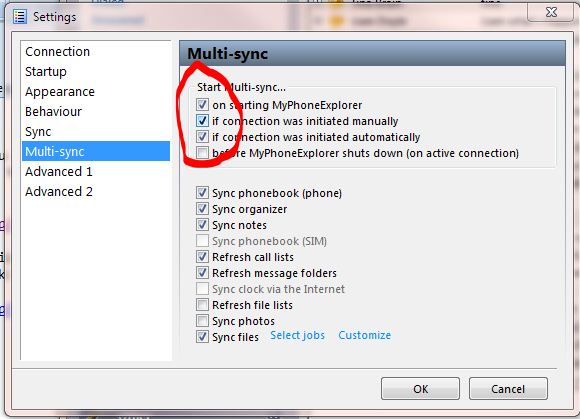
Automatic sync in time periods
Verfasst: Do 9. Aug 2012, 19:14
von gustavo_v
I wish that MPE have automatic time period sync, and if i change something in phone or outlook, automatic changes the other part.
Thanks in advance, MPE is the best
Re: SYNC FREQUENCY
Verfasst: Do 9. Aug 2012, 20:34
von Capt Sensible
[quote="southcot"]
You can set a number of triggers for starting sync. Depending on which are selected the sync could start each time a connection is briefly lost or started?
[img]http://southcot.co.uk/TempFiles/MPESrartSync.JPG[/img][/quote]
Whilst grateful for your response, Charlie, I'm afraid the present options are far too blunt an instrument. In short, I agree with Gustav's answer: we ought at least to be able to set the sync frequency by time period.
Starting a phone call from software ( BUG ? )
Verfasst: So 12. Aug 2012, 10:11
von cybmatrix
Hi there.
I noticed that when starting a call from MPE, if a bluetooth headset is connected to the phone, the call starts in classic way ( bypassing the headset ).
So every time, I have to hang up, and then recall from the phone ...
Is there a solution ?
THANKS.
ANDREA
SMS button missing in contact menu !
Verfasst: So 12. Aug 2012, 10:23
von cybmatrix
What do you think about adding a TEXT MESSAGE button to the contact menu like here ?

Verfasst: Mo 13. Aug 2012, 23:14
von gnexus01
I would like faster transfer speed over WiFi. I'm getting only around 120kb/s which is very slow when you want to transfer several hundred MB.
Number pad?
Verfasst: Fr 17. Aug 2012, 07:56
von 7thsign
If the phone is connected via USB then you easy can make phone calls by entering the number on you keyboard, but if you have to press any digit in your call (IVR for example) then you have to do it manually on the phone. I wish there was an function for entering digits via the keyboard even during the call.
Verfasst: So 19. Aug 2012, 01:58
von FJ
@Capt sensible: As i said, use the task sheduler as trigger. Enter taskschd.msc in Start->Run. You should also add flags=noerrmsg to the commandline so the error message will be shown as balloon message
@cybmatrix: I thought already about this but i found that this makes the dialog very full filled. The headset handling of calls cannot be controlled (but i tried it with my Nexus and it did not happen there - interesting)
@gnexus: A common transfer speed throught WiFi with MyPhoneExplorer is something about 1000KB/s, there is something wrong in your environment, this has nothing to do with MyPhoneExplorer
@7thsign: I already tried to implement this (called DTMF Tones) but badly this interface is blocked for "normal apps" like MPE in Android

