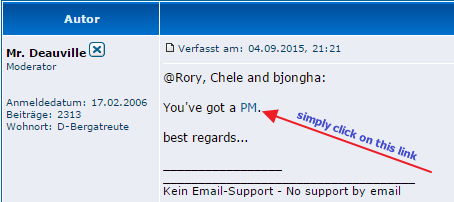
@Rory, Chele and bjongha:
You've got a PM.
best regards...
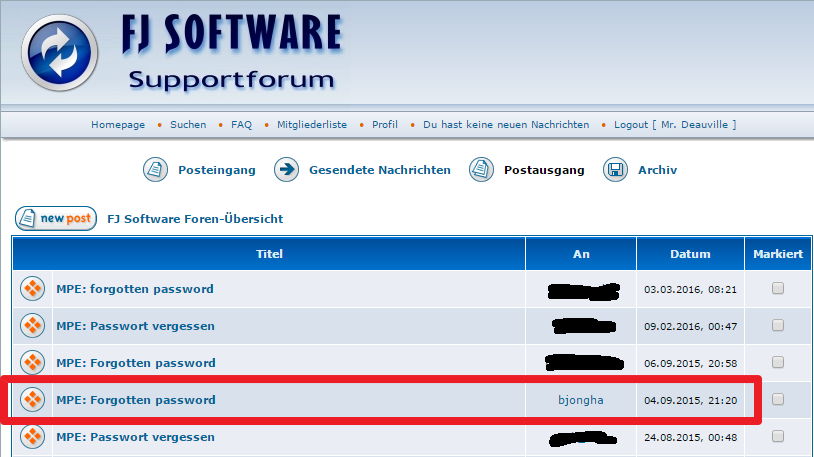
Forgotten password
NO PM received
[quote="Mr. Deauville"]@Rory, Chele and bjongha:
You've got a [url=http://www.fjsoft.at/forum/privmsg.php?folder=inbox]PM[/url].
best regards...[/quote]
Unfortunately, I don't have your PM. Please send it again at jongha.baek@zf.com.
thanks.
You've got a [url=http://www.fjsoft.at/forum/privmsg.php?folder=inbox]PM[/url].
best regards...[/quote]
Unfortunately, I don't have your PM. Please send it again at jongha.baek@zf.com.
thanks.

Suddenly asking for password
I haven't forgotten my password because I never set one, but I'm now being asked for a password when I try to connect to my Android phone via wifi. Please note, it is NOT the wifi PIN that I am being asked for.
-
adnan.ahmed
- Beiträge: 1
- Registriert: So 22. Mai 2016, 06:32
I do not remember my password
Hello,
I have forgotten my password. I am using version 1.7.0.6 of MyPhoneExplorer with Sony Ericsson phone. Could someone please help me to either recover or reset the password? Thank you.
Adnan
I have forgotten my password. I am using version 1.7.0.6 of MyPhoneExplorer with Sony Ericsson phone. Could someone please help me to either recover or reset the password? Thank you.
Adnan
forgotten password
Hi,
I don´t remember having set a pwd in one of my phones, but aparently did so, and I can´t remember it. Could you please tell me how to reset it? or delete it?
thanks!
yakovlev
I don´t remember having set a pwd in one of my phones, but aparently did so, and I can´t remember it. Could you please tell me how to reset it? or delete it?
thanks!
yakovlev
-
user_deleted

phone password not wifi password
Hello.
After I enter the correct wifi password, MPE asks me for the phone password. (My phone is a Galaxy S5 and the phone name given in MPE is "s5.") So the message is "Enter the password for "s5":
Nothing I enter works. I have changed the phone password several times and it still gives me error: "The stated password is wrong!"
How do I fix this?
MPE running on ASUS G870 - Win 10 hone - i7 - 8 GB - x64 , phone is Samsung s5.
Thanks for any ideas.
After I enter the correct wifi password, MPE asks me for the phone password. (My phone is a Galaxy S5 and the phone name given in MPE is "s5.") So the message is "Enter the password for "s5":
Nothing I enter works. I have changed the phone password several times and it still gives me error: "The stated password is wrong!"
How do I fix this?
MPE running on ASUS G870 - Win 10 hone - i7 - 8 GB - x64 , phone is Samsung s5.
Thanks for any ideas.
-
don-rozario
- Beiträge: 2
- Registriert: Mi 20. Jul 2016, 23:17
-
user_deleted
Hi do-rozario,
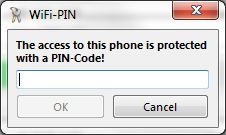
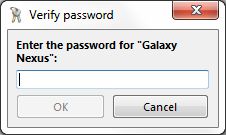
WiFi-PIN is not the same as MPE-password, so which type do you get?
1.
or
2.
If you get something like first picture, you've changed the WiFi-PIN and you can set this free as you want in the MPE client settings. When starting MPE on desktop, you have to enter same PIN as you gave in the client on your device.
If you get something like second picture, you've set a MPE desktop password, which has nothing to do with your WiFi PIN, but to protect your MPE data.
For second case, you've got a PM.
best regards...
WiFi-PIN is not the same as MPE-password, so which type do you get?
1.
or
2.
If you get something like first picture, you've changed the WiFi-PIN and you can set this free as you want in the MPE client settings. When starting MPE on desktop, you have to enter same PIN as you gave in the client on your device.
If you get something like second picture, you've set a MPE desktop password, which has nothing to do with your WiFi PIN, but to protect your MPE data.
For second case, you've got a PM.
best regards...
-
don-rozario
- Beiträge: 2
- Registriert: Mi 20. Jul 2016, 23:17
-
user_deleted
