Seite 48 von 104
Separated address columns
Verfasst: So 13. Sep 2009, 14:38
von tiBorec
FJ hat geschrieben:I know, but the title can be showed if you change the Name-Format in the settings
Well, thanks, I didn't notice this. Nevertheless, as you said, the single column is still missing

Maybe there is one another thing you could improve. I'd appreciate separated columns for items of both addresses (Street, Postcode, City, State, Country). It could be analogous to "Name = First name + Last name" items: there would be 2 basic columns with the whole address and 2x5 optional columns for the particular items of the addresses (Street, Postcode, ...).
Further there could be some "Display format for addresses" in "Advanced 1" settings.
Bye,
Tibor
Verfasst: So 13. Sep 2009, 15:33
von FJ
I dont think that these things are really needed. If you want seperate colums for each field you can use also the CSV-Export
Verfasst: Mo 14. Sep 2009, 23:34
von F14 TOMCAT
Hi,I have just downloaded the last version of MPE (V. 1.7.4 ) and just want to say "Many Thanks" My friend FJ for remembering What You said about making MPE to remember the last Picture Format.
You are a Truthful person and a real Promise Keeper,But Remember :
'However The "MPE" is Lovely,Nice and Deep , But there are still promises to keep and Miles to Go before you sleep'. 
Thanks Again
minor UI bug (Settings, Multi-Sync)
Verfasst: Mi 16. Sep 2009, 13:02
von johnnyzero
I've noticed a minor issue with the text being a little weird in the Settings, Multi-Sync window:
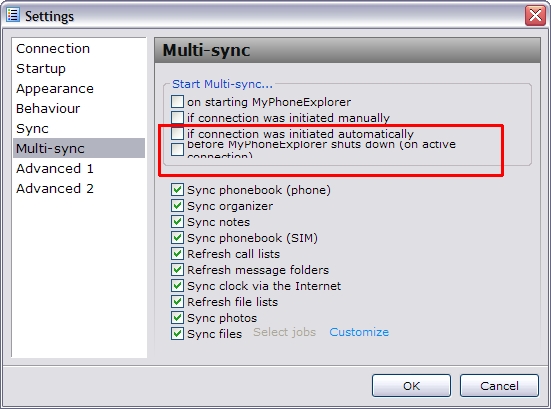
JohnB
Verfasst: Mi 16. Sep 2009, 13:44
von Leif
Looks OK on my computer. Perhaps font related. But just open English.lng in Notepad and change 'MyPhoneExplorer' on that line to 'MPE'. Perhaps that'll do the trick.
Verfasst: Mi 16. Sep 2009, 14:19
von johnnyzero
Thanks, Leif. Your suggestion fixed it. That line in the language file was simply too long and for some reason on my system it was getting wrapped.
btw, I don't think it's a font issue - I'm using the default XP theme, and I don't have "Use Large Fonts" or any other nonsense enabled.
Thanks again.
Verfasst: Mi 16. Sep 2009, 17:04
von FJ
@johnnyzero: Which font is shown in the Settingswindow of MyPhoneExplorer as "System standard" ?
Verfasst: Mi 16. Sep 2009, 17:58
von johnnyzero
You're right - the font setting in MPE does have an effect on this issue. I had assumed Leif was referring to my Windows font settings.
I was using Verdana as my MPE font. I tried using some other fonts, and the line wrap problem occurs with them as well. The only font I could find that works correctly is Arial.
Maybe in a future version you could just make the Settings window slightly wider, which would probably take care of this problem altogether.
thanks, JohnB
Calendar and notes synchronisation
Verfasst: Mo 21. Sep 2009, 00:15
von lldeon
Why the advanced synchornization configuration are'nt available for the Only MyPhoneExplorer option? I think it would be perfect to have the same options for internal program database as there are for Outlook.
Verfasst: Do 24. Sep 2009, 13:22
von F14 TOMCAT
Hi Friends,I was working with the "Messages" and it came to my mind that because of that notorious problem of "Sent SMS'S Time and date" ([That is :It's not possible to get the "send date and time" from phone if the message wasn't send directly from MyPhoneExplorer. Of course, the timestamp of sending is shown in the phone, but there's no way of getting that out from it - its a unsolvable glitch.]) , it would be very great if it could be possible to have "Inbox" and "Sent items" panels in one screen (Divided in 2 Sub-panel) Somehow,So that it would be possible to work with The both Messages (in Inbox ans Sent items) manually and make a lead and save the related messages in one single file.
Is not It Possible Really?
THANKS
Verfasst: Do 24. Sep 2009, 15:38
von FJ
Earlier i thought about a combined list which allows to Drag&Drop sent items so there would be a calculated sent-date at least for the sort-order. But i did not implement this cause its not self-explaining enought.
Verfasst: Do 24. Sep 2009, 17:07
von F14 TOMCAT
"I did not implement this cause its not self-explaining enough."
What do you mean by "not self-explaining" exactly? Why not?
Verfasst: Do 24. Sep 2009, 17:20
von FJ
In my opinion its not intuitive - the user does not know what to do if he sees the combined list the first time.
Verfasst: Do 24. Sep 2009, 17:53
von F14 TOMCAT
You yourself say: " the first time",So Maybe this is true at first my friend,But it worths doing.
Dear FJ everything at first is the same even for me when I first Used MPE it was like that but after awhile it became handy.
Another reason is that progressing is needed and it is not a good reason to stop the progression just for the reason of a temporary confusion or something like that.
Besides,it can be done as a separate option,I mean we can have both the old and this new combined tabs all-together I think.
After all if it is possible to do then don't worry, everybody needs to use it will learn what to do with it.
THANKS And Excuse My persistence.
Verfasst: Do 24. Sep 2009, 17:57
von Nisses
Combined view would be very much appreciated.
Sync with calendar from Windows Live Mail
Verfasst: Mi 30. Sep 2009, 19:28
von LiTuNi
First of all: Hi and thanks for such a great app.
Some time ago (about at page 17 of this thread) I already asked if there was a chance in getting MPE to sync with Windows Live Mail's contacts (and for what I've read in
this thread it's not possible) Now I have a different request regarding Windows Live Mail.
I used Windows Vista Calendar a lot, and had it always synced with MPE, but I got a new laptop and a chance to install Windows 7, so I did. To my surprise Windows 7 no longer has a Calendar. Microsoft seems to have merged it into Windows Live Mail. So, my request:
Could it be possible to have MPE's calendar and Windows Live Mail's calendar synced?
Thanks in advance whatever the answer is, and sorry if i didn't myself clear as english isn't my "default" language.
Verfasst: Mi 30. Sep 2009, 22:25
von FJ
I'll take a look at it...
Verfasst: So 4. Okt 2009, 02:10
von Nisses
My other question is - will it be possible to choose alarm sounds?
I thought there is a way but...
This is awkward to tell. I run MyPhoneExplorer to see my alarm settings. I saw two groups: one for regular alarm and second one for recurrent alarm. There were also Save and Deactivate buttons for each of those two groups. And below those two groups there was an edit box to set the alarm sound. AFAIR it was disabled, but i'm not sure. But then i must have pressed F1 and change view to notes or something like that. When i went back to alarms the window was looking different. There is only one button Apply. The recurrence is marked using red circled arrows. BTW the inactive alarm times are not being updated at all.
But to the point. I'm confused. First i thought that maybe the program detected that i changed to newer phone. But then i recalled I recently made fresh system and software install after seven years so it is not possible - i installed MPE and have been using it only with my latest phone. Are there some kind of detect phone features and form adapt techniques in your program?
The screen NOW looks like the one below. I don't have that previous and odd looking window captured but my description should tell you enough.

Please also tell my what is the meaning of 'Disable automatic disconnect/reconnect'. I can understand the 'reconnect' part - i belive it automatically connects if in disconnected state there is a request being send to phone. But what is 'automatic disconnect'? There is other 'disconnect after 5 minutes' inactivity' so this one has to do something else. Could you explain what is 'automatic disconnect'?
Also is there a way to run some commands to keep connection alive? Any diagnostic mode for that maybe?
Verfasst: So 4. Okt 2009, 07:16
von FJ
On earlier phones (those which had only 2 alarms f.e. K700i) it was possible to set the alarm-sound. On actual phones its not possible. You see the old screen for a second cause MPE detects first if you have a phone which supports 2 or 5 alarms.
BTW the inactive alarm times are not being updated at all.
Thats normal, its technically not possible to read/write inactive alarms.
Please also tell my what is the meaning of 'Disable automatic disconnect/reconnect'.
It means what it says. If enabled then MPE does check all 10 Seconds the connection. If the connection gets lost it closes the Port automatically. But with Bluetooth the reconnect is disabled as long as MPE is not minimized cause every connection-request blocks MPE for a few seconds.
Verfasst: So 4. Okt 2009, 19:45
von Nisses
Thanks for your reply. FYI it was not a second, more like 30 seconds - i had the time to play with those controls before the form changed. A bug?
My next question: everytime i press refresh inbox the MPE loads all my inbox messages (usually 2 or 3 thousands of messages) and it takes 20 or 30 seconds to complete. Is it possible to add a 'quick reload' that just loads 10% of latest messages? Aren't the messages in phone put in a sorted by time order giving the ability to load only the needed messages? Knowing previous inbox content count and current messages count you could load just additional messages or assuming some of them were deleted u could increse that number by 10% (could be editable in options) of preexisting messages count. I think full reload would be made from time to time to check which messages were deleted but on a daily basis it would be 'quick reload' being used.
That is if the messages in phone are in particular order.
So... is it possible?