Seite 1 von 1
MPE Tasks : fast scroll slider on the right side
Verfasst: Sa 4. Mai 2019, 22:55
von taparoles
Hello,
On MPE Tasks, I often use the fast scroll slider on the right side of the list (see the red arrow on the picture below, it's not MPE but you get the idea).
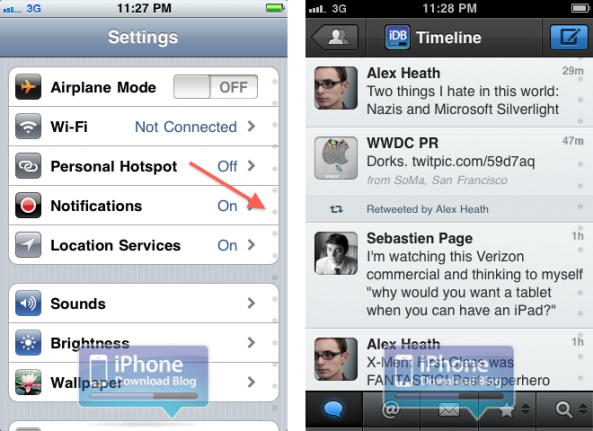
It worked all right on my previous phone, on a old version of MPE.
But today, with my new phone (Samsung Galaxy S10e) and the latest version of MPE, it doesn't work anymore.
Is there a setting somewhere that allows to activate it ?
Thanks.
Verfasst: So 30. Jun 2019, 14:30
von taparoles
Hello,
I posted the above message almost 2 months ago, without answer.
Maybe it's on the wrong sub-forum ?
Thanks.
Verfasst: Mo 1. Jul 2019, 13:00
von Koelner
I´m not sure what the problem is.
Does the MPE at all not work anymore or is there just a problem with tasks?
And what exactly is the problem with the slider?
Verfasst: Mo 1. Jul 2019, 13:28
von taparoles
Thanks for your message.
MPE works perfectly, except the right slider on the Tasks app.
On older versions of the app, I was able to slide (up or down) a finger on the right side of the screen, which made the tasks scroll very fast (it even allowed an instantaneous access to some tasks, if you "tap" the slider on some position instead of "scroll").
That's very useful when you have hundreds of Tasks.
Now, the slider that you see on the right side is only a "display", I can't scroll it directly anymore.
The other way to scroll (from anywhere in the page) still works all right, but it's slower.
Verfasst: Mo 1. Jul 2019, 17:34
von Koelner
OK, we need more information.
What App version have you installed? What Android have you running?
Verfasst: Mo 1. Jul 2019, 17:45
von taparoles
Samsung Galaxy S10e.
MPE 1.0.66
Android 9
Do you have the right-side scroll feature on your phone ?
Maybe FJ deleted that feature (so that would not be a bug, but an evolution of the software).
Verfasst: Mo 1. Jul 2019, 21:31
von Koelner
I never use it but I checked with my phone.
Works fine and when I have more tasks than fit on the screen, I can scroll.
Try this version:
http://www.fjsoft.at/files/MyPhoneExplo ... Update.exe
Verfasst: Di 2. Jul 2019, 16:42
von taparoles
>> Works fine and when I have more tasks than fit on the screen, I can scroll.
Are you sur you used the scroll from the right side ?
It should be completely different from the scroll using any other place.
Dragging from center : smooth scroll.
Dragging from the right side : you should be able to get instantaneous access, without smooth scrolling.
>> Try this version:
http://www.fjsoft.at/files/MyPhoneExplo ... Update.exe
I'm not sure I understand.
My problem is only on the app, in the smartphone.
I see no problem at all in the Windows software.
Thanks for your time.
Verfasst: Di 2. Jul 2019, 18:58
von icke1954
Does this feature work in other apps on the S10?
This feature is a bit tricky
1. Beginn with normal scrolling
2. The scroll bar appears
3. Grab the scrollbar and move
Verfasst: Mi 3. Jul 2019, 11:37
von taparoles
>> Does this feature work in other apps on the S10?
Yes, for example the list of contacts.
It did work on MPE, but I don't know at which update version it stopped working (my previous phone used an old version of MPE).
Maybe FJ deleted that feature (because it became too difficult to maintain on newer Android versions, etc...)
If that's the case, I can live without that feature

Verfasst: Mi 3. Jul 2019, 11:48
von icke1954
As already mentioned, the scroll bar works for me (Galaxy S8, Android 9, MPE client 1.0.66)!