Outlook text formatting problems after upgrade to 1.8.3
Verfasst: Mo 30. Jul 2012, 06:04
After upgrading to MPE 1.8.3 and client 1.0.20, wierd things happen with the text formatting in Outlook.
- Both in Outlook and on the phone, I do not use text formatting of the Notes field.
- On the phone I make a change to a Contact or to an Appointment (to the Notes field, or to another field, does not matter).
- Sync with MPE.
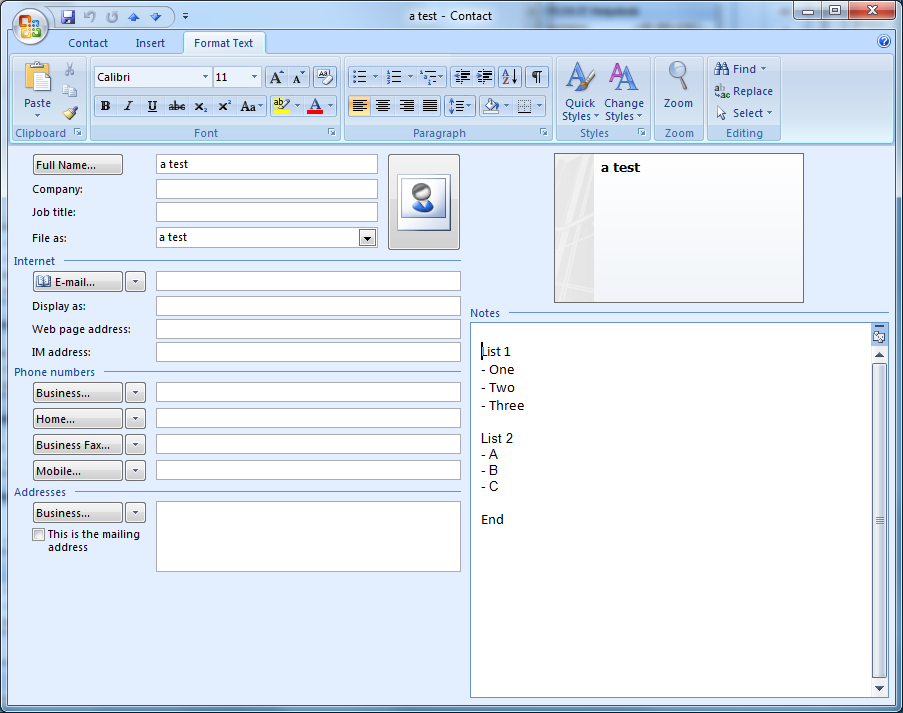
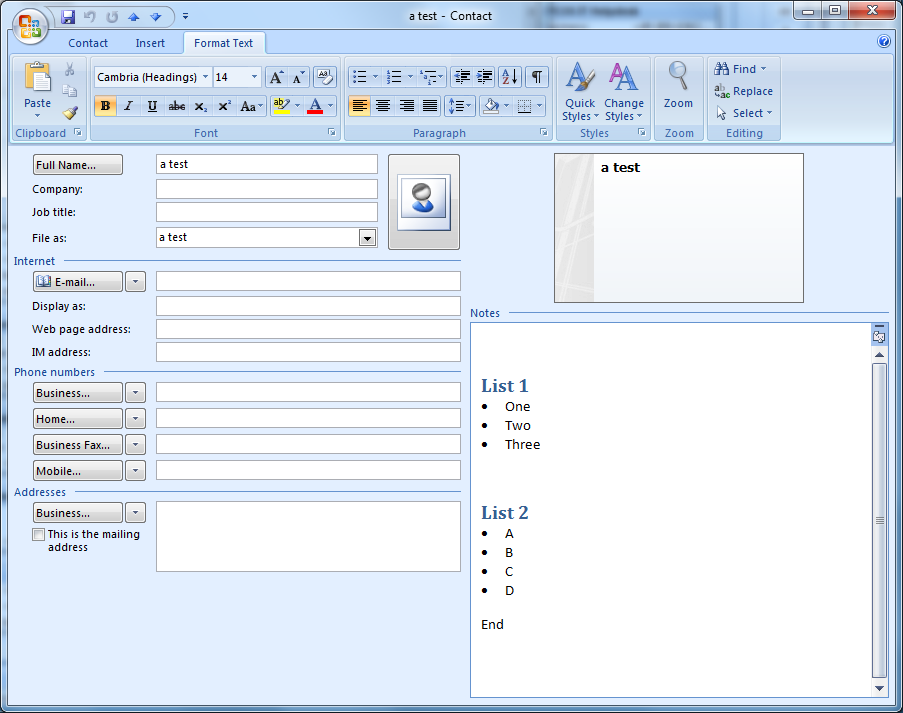
- In Outlook the formatting of the Notes field is changed (from default Calibri 11, to Cambria 14 headings and bullits).
- This happens to Contacts and Appointments.
Before upgrading to MPE 1.8.3 and client 1.0.20 this never happened.
How can I prevent this weird, undesired, behaviour?
Windows 7 Pro 64 bit
Outlook 2007 32 bit
MPE 1.8.3
Client 1.0.20
WiFi
HTC Desire Android 2.2.2
Example:
Before syncing with MPE:
After making a change on the phone and syncing with MPE:
_________________
Windows 7 Pro 64 bit - Outlook 2007 32 bit - MPE 1.8.3 - Client 1.0.20 - WiFi - HTC Desire Android 2.2.2
- Both in Outlook and on the phone, I do not use text formatting of the Notes field.
- On the phone I make a change to a Contact or to an Appointment (to the Notes field, or to another field, does not matter).
- Sync with MPE.
- In Outlook the formatting of the Notes field is changed (from default Calibri 11, to Cambria 14 headings and bullits).
- This happens to Contacts and Appointments.
Before upgrading to MPE 1.8.3 and client 1.0.20 this never happened.
How can I prevent this weird, undesired, behaviour?
Windows 7 Pro 64 bit
Outlook 2007 32 bit
MPE 1.8.3
Client 1.0.20
WiFi
HTC Desire Android 2.2.2
Example:
Before syncing with MPE:
After making a change on the phone and syncing with MPE:
_________________
Windows 7 Pro 64 bit - Outlook 2007 32 bit - MPE 1.8.3 - Client 1.0.20 - WiFi - HTC Desire Android 2.2.2
