I have used MPE for years but now it asks for the password for my new phone to enable synching. I hadn't set one so was confused as my connection was through a pin via Wi-Fi only. I decided to create a password on the phone but MPE refused that as well.
Is there any way of resetting MPE so that it recognises my phone?
Password requested for new Samsung Phone
To be honest, I don't understand you?
For a new phone must be created a new user
The first time you connect via WiFi, the MPE WiFi pin is queried.
You have stored this in your cell phone = MPE client = Settings = WLAN PIN.
Have you unknowingly assigned a password to the new user in MPE (PC), see https://www.fjsoft.at/forum/viewtopic.php?t=29015
For a new phone must be created a new user
The first time you connect via WiFi, the MPE WiFi pin is queried.
You have stored this in your cell phone = MPE client = Settings = WLAN PIN.
Have you unknowingly assigned a password to the new user in MPE (PC), see https://www.fjsoft.at/forum/viewtopic.php?t=29015
Password requested for new Samsung Phone
I did create a new user with my new Galaxy S24 Ultra and linked it using the Wi-Fi Pin (which I had for my old phone) and everything seemed to work.
However, it is only recently that I get a dialogue box titled "Verify Password" with the request to enter the password for my phone. I do have a Samsung Account password on my phone but that is not the one MPE wants and it comes back with an error "The stated password is wrong".
As I said, I've never had to input a password before to connect to MPE, only the Wi-Fi Pin. Should I create another Pin to see if this fixes the problem or is there another way to correct the connection to the phone?
I am very disappointed as I trusted the MPE software from the start with my synching, I even donated some money a long time ago to ensure this software gets updated. Now, I'll have to consider some other software unless I can get a solution.
However, it is only recently that I get a dialogue box titled "Verify Password" with the request to enter the password for my phone. I do have a Samsung Account password on my phone but that is not the one MPE wants and it comes back with an error "The stated password is wrong".
As I said, I've never had to input a password before to connect to MPE, only the Wi-Fi Pin. Should I create another Pin to see if this fixes the problem or is there another way to correct the connection to the phone?
I am very disappointed as I trusted the MPE software from the start with my synching, I even donated some money a long time ago to ensure this software gets updated. Now, I'll have to consider some other software unless I can get a solution.
I am having the exact same issue on a new Samsung S25. (I did delete the old phone as a user and set up a user/pin for the new phone - which works fine when I manually enter the pin after the password prompt.) Was this ever resolved and what was the solution. Thank you for any assistance.
[u]Followup:[/u]
I found the following instructions, which seem to have resolved my issue, however I am confused as to why deleting the password is the correct way to go. Would love an explanation if anyone can elaborate. Is my phone still protected by a pin or did this eliminate the requirement of a pin? Appreciate any clarity that can be offered. Thank you.
1. Activate [User "...S10 Samsung..."]
2. File => User... => [User "...S10 Samsung..."] => Change name/password => input password + OK
3. New password: delete password
4. Repeat new password: delete password
5. OK
[u]Followup:[/u]
I found the following instructions, which seem to have resolved my issue, however I am confused as to why deleting the password is the correct way to go. Would love an explanation if anyone can elaborate. Is my phone still protected by a pin or did this eliminate the requirement of a pin? Appreciate any clarity that can be offered. Thank you.
1. Activate [User "...S10 Samsung..."]
2. File => User... => [User "...S10 Samsung..."] => Change name/password => input password + OK
3. New password: delete password
4. Repeat new password: delete password
5. OK
I didn't quite understand your problem, but I try it anyway:
In MPE there is a WLAN pin that only has to be entered once at the first start of the program. You have stored this WLAN pin in the cell phone = MPE client = settings = WLAN pin.
To protect the data on the PC, you can assign a password to a user and have the data encrypted.
In order to be able to access the user, entering the password is required every time.
In MPE there is a WLAN pin that only has to be entered once at the first start of the program. You have stored this WLAN pin in the cell phone = MPE client = settings = WLAN pin.
To protect the data on the PC, you can assign a password to a user and have the data encrypted.
In order to be able to access the user, entering the password is required every time.
Thank you for your reply. My issue was that after upgrading to a new phone and setting up a new user... the MPE program on my phone gave me a pop up message asking me to verify my 'password' every time I started MPE to sync with my phone. I would manually respond with my 'WiFi pin', and the phone would then sync. As this had never happened with my previous phones, I searched the forum and found the solution (which I mentioned above} that you had responded to in an older post. I was just trying to understand the logic behind that solution being that it worked for me. If I understand correctly, it seems that I inadvertently set a user password (the same as my WiFi pin, which I deleted per those instructions) in addition to the phone WiFi pin... thinking that they were one and the same. Does that sound correct? Thanks again

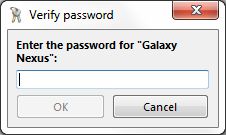
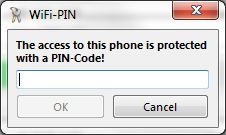
Thanks for the information, that sounds logicalPhilF hat geschrieben:Sorry, the problem that I 'was' having was related to the fist picture asking for the password for the phone. I am assuming that I inadvertently created a phone password (thinking it was asking for the WiFi pin}, which would explain why deleting it resolved my issue. Sound about right?

For about a month I was getting the same "Verify Password" prompt every time MPE was launched on my Win11 computer, and what worked was my wifi password. I upgraded from 2.1 to 2.2, deleted/re-entered user info, then uninstalled and re-installed MPE to no avail. In Settings > User I've provided the password for the phone, but it still prompts me every time, and I can't find a setting on the phone that helps. I read this thread and didn't find a solution, so any help would be appreciated.
If you have assigned a password to a user, you will be asked for it each time you access this user. That's the whole point of password protection, isn't it?! If you don't want that, you should remove the password. The Wi-Fi PIN you assigned in the MPE client on your phone will only be requested once.
Well, that was simple: Blank the user password and no more prompt. I thought I had tried that before, but it works now. Thanks for the prompt reply. One more unrelated question while I'm here: In v2.2 when I launch MPE and close it ("X" out of window) it now closes the icon on the tray, which I don't recall it doing in earlier versions. How can I "restore" the app (open it in a window) and close it without closing the icon on the tray?
Sorry, but I'm not sure what you mean. Please check the settings. MPE => F2 => Sturtup => Start => minimizediclick hat geschrieben:In v2.2 when I launch MPE and close it ("X" out of window) it now closes the icon on the tray, which I don't recall it doing in earlier versions. How can I "restore" the app (open it in a window) and close it without closing the icon on the tray?
Checked items are Start Minimized, Connect on Startup, Start Multi-sync, and Notes (Start Page). That works as it always has, which is to start MPE minimized with a tray icon showing, but if I "Restore" (show full MPE organizer screen) and close (X) it the icon on the tray also disappears. I just noticed that there is a (new?) symbol to the left of the minimize symbol (-) in the shape of a triangle (labeled "Minimize to Tray"), which I don't recall seeing in earlier versions (but I could be wrong). Using this symbol does the job, so I'll just need to train myself to do that instead of closing with the X. Is that a new feature?

The minimize button is really not new but there is a setting in advanced 1 so that MyPhoneExplorer will use the X-Button also as Minimize-Button.
Ich bitte um Verständnis daß ich aufgrund des hohen Aufkommens im Forum und meines zeitlichen Rahmens nichtmehr jeden Thread im Forum persönlich lesen bzw. beantworten kann.
Bitte benutzt auch die Forum-Suche bzw. die FAQ
Bitte benutzt auch die Forum-Suche bzw. die FAQ