Outlook text formatting problems after upgrade to 1.8.3

For user who dont speak german please use this part of my forum
Antworten
Ramon
Beiträge: 11
Registriert: Di 28. Dez 2010, 22:06
Wohnort: Netherlands

Outlook text formatting problems after upgrade to 1.8.3

Beitrag von Ramon »

After upgrading to MPE 1.8.3 and client 1.0.20, wierd things happen with the text formatting in Outlook.

- Both in Outlook and on the phone, I do not use text formatting of the Notes field.
- On the phone I make a change to a Contact or to an Appointment (to the Notes field, or to another field, does not matter).
- Sync with MPE.
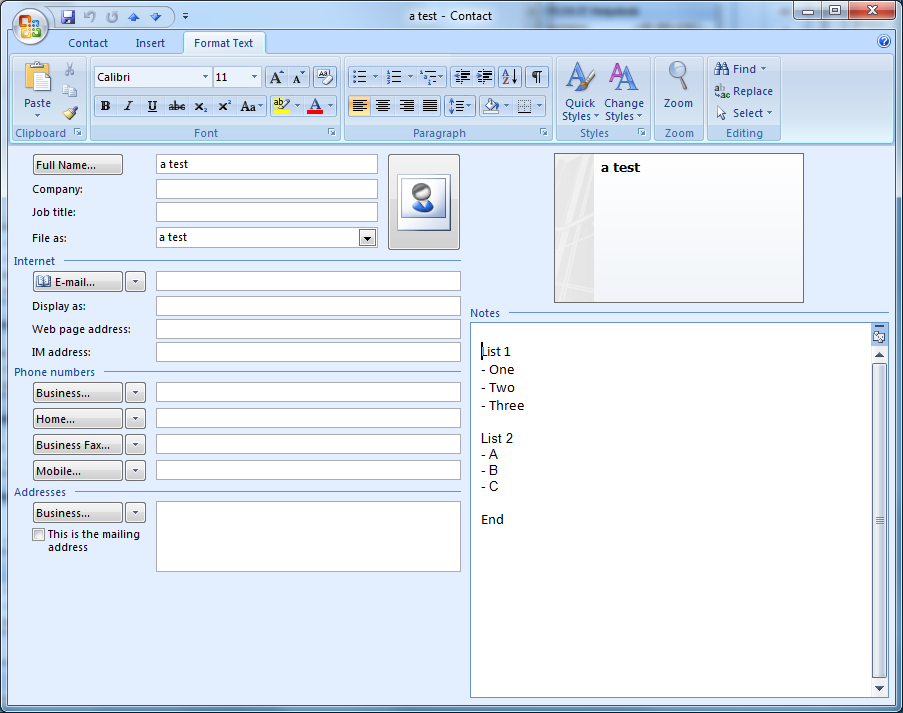
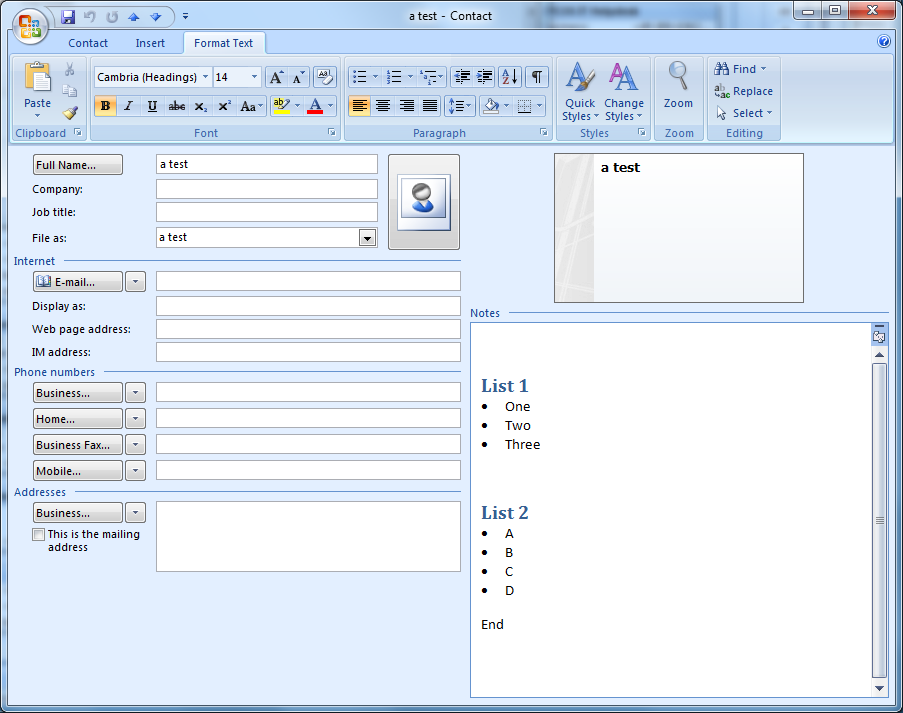
- In Outlook the formatting of the Notes field is changed (from default Calibri 11, to Cambria 14 headings and bullits).
- This happens to Contacts and Appointments.

Before upgrading to MPE 1.8.3 and client 1.0.20 this never happened.
How can I prevent this weird, undesired, behaviour?

Windows 7 Pro 64 bit
Outlook 2007 32 bit
MPE 1.8.3
Client 1.0.20
WiFi
HTC Desire Android 2.2.2

Example:
Before syncing with MPE:
Bild

After making a change on the phone and syncing with MPE:
Bild

_________________
Windows 7 Pro 64 bit - Outlook 2007 32 bit - MPE 1.8.3 - Client 1.0.20 - WiFi - HTC Desire Android 2.2.2
FJ
Site Admin
Beiträge: 32117
Registriert: Mi 15. Feb 2006, 01:16
Wohnort: Tirol

Beitrag von FJ »

Hmm, you could disable the new Outlook-Interface which will probably cause your problem. Just rename the file C:\Programs (x86)\MyPhoneExplorer\DLL\fjsoftMAPI.dll to fjsoftMAPI_backup.dll. Close MyPhoneExplorer before you do this!
Ich bitte um Verständnis daß ich aufgrund des hohen Aufkommens im Forum und meines zeitlichen Rahmens nichtmehr jeden Thread im Forum persönlich lesen bzw. beantworten kann.

Bitte benutzt auch die Forum-Suche bzw. die FAQ
Ramon
Beiträge: 11
Registriert: Di 28. Dez 2010, 22:06
Wohnort: Netherlands

Beitrag von Ramon »

Yes, this solved the problem. :-)
Thanks!

(By the way, on my PC, the exact location of the file is: C:\Program Files (x86)\MyPhoneExplorer\DLL\fjsoftMAPI.dll)

_________________
Windows 7 Pro 64 bit - Outlook 2007 32 bit - MPE 1.8.3 - Client 1.0.20 - WiFi - HTC Desire Android 2.2.2
Ramon
Beiträge: 11
Registriert: Di 28. Dez 2010, 22:06
Wohnort: Netherlands

Beitrag von Ramon »

For your information:

After upgrading from MPE 1.8.3 to 1.8.4, the same Outlook formatting problem was there again.

The problem was solved again by doing the same thing as the previous time:
Rename the file C:\Programs Files (x86)\MyPhoneExplorer\DLL\fjsoftMAPI.dll
to fjsoftMAPI_backup.dll

_________________
Windows 7 Pro 64 bit - Outlook 2007 32 bit - MPE 1.8.4 - Client 1.0.21 - WiFi - HTC Desire Android 2.2.2
Ramon
Beiträge: 11
Registriert: Di 28. Dez 2010, 22:06
Wohnort: Netherlands

Beitrag von Ramon »

After upgrading from MPE 1.8.4 to 1.8.5, the same Outlook formatting problem was there again.
But now there was an additional and more serious problem. Changes which are made on the phone, do, after sync, appear in MPE. But they do not appear in Outlook. Only after restarting Outlook the changes appear in Outlook.

Both problems were solved by doing the same thing as the previous time:
Rename the file C:\Programs Files (x86)\MyPhoneExplorer\DLL\fjsoftMAPI.dll
to fjsoftMAPI_backup.dll

Windows 7 Pro 64 bit - Outlook 2007 32 bit - MPE 1.8.5 - Client 1.0.26 - WiFi - HTC Desire Android 2.2.2
FJ
Site Admin
Beiträge: 32117
Registriert: Mi 15. Feb 2006, 01:16
Wohnort: Tirol

Beitrag von FJ »

Hi

Instead of always deleting fjsoftMAPI.dll there is a better solution inbetween:

- Start-Run-%appdata%\MyPhoneExplorer\general.ini-OK
- add a new line below [Main]: UseOutlookObjectModel=1
- save the file

This flag will prevent MyPhoneExplorer from using the alternative Outlook-Interface and it will be kept during updates.
Ich bitte um Verständnis daß ich aufgrund des hohen Aufkommens im Forum und meines zeitlichen Rahmens nichtmehr jeden Thread im Forum persönlich lesen bzw. beantworten kann.

Bitte benutzt auch die Forum-Suche bzw. die FAQ
zee
Beiträge: 13
Registriert: Mi 15. Aug 2012, 16:48

Beitrag von zee »

Hi. I can't find the general.ini* file mentioned above anywhere. Running v1.8.5.

edit:
found the general.ini file after a full-search on laptop...
Antworten